Live12 performer interface
Live12 starts on LIVE: one performance surface with latched sections. Select a section, release its button, then use the knobs and musical keys. No pagination. All LIVE display text is at least 20 px: labels/status 20, heading 24, values 36. The detailed legacy editor keeps its original layout and fonts.
Start playing
- On 303 A, press OCT+ for a phrase, then PLAY.
- Tap ARP to select Director. Tap ARP again to coordinate B and the drum kit.
- First four black keys select 909, 808, 303 A and 303 B. Hold SEL to link parts.
- Tap EDIT for the selected instrument, LFO for Mixer, FX for momentary effects, ENV for Automation, or ARP for Director. These selections latch.
Key numbers below count white or black keys separately, from the left.
Instrument
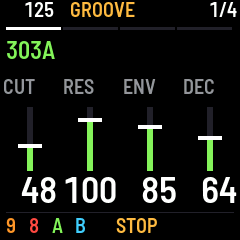
The four 303 knobs control cutoff, resonance, envelope modulation and decay. Continuous instrument controls use sliders in K1–K4 order; numbers are right-aligned. Named choices such as waveform remain text. Tap EDIT again for accent, waveform, combined drive and transpose; again returns to the native controls. Independent patches and levels remain independent. Tapping the selected part's black key repeats the EDIT action. In Mixer, black keys retain their mute function. Transpose is −24..+24 semitones on the current 303 pattern; linked selection adjusts both, without rewriting notes.
DRIVE 0 is off, 1–63 spans SOFT 1–127, and 64–127 spans RAT 1–127. Only RAT has a soft toe: positions 64–68 give RAT amounts 1–5; position 69 gives 6, then the range scales up to RAT 127 at position 127.
The first six white keys on a 303 apply small relative sound macros: Dry, Squelch, Bite, Dub, Thin and Wide. Changes are bounded by each control's range. They can operate on both selected 303s. Manual note playing remains in SEQ.
On drums, white keys select instruments; knobs control tuning, character, decay and drive where supported. EDIT selects instrument level/pan/reverb/delay. EDIT + PRESETS changes drum distortion type. PRESETS normally selects a drum instrument or the focused 303 waveform.
Mixer
Tap LFO for Mixer Level. Further LFO taps cycle Level, Pan, Reverb and Delay, then wrap to Level. SELECT cycles these views in either direction. HOME + SELECT changes tempo in Mixer; SELECT elsewhere in LIVE remains tempo.
Each view contains four sliders, left-to-right: K1=909, K2=808, K3=303 A, K4=303 B. Pan sliders are horizontal with a center mark; other mixer sliders are vertical. M indicates a muted part. Black keys 1–4 directly toggle parts; white keys 1–11 toggle instruments in the focused kit. PRESETS switches that kit between 909 and 808.
Hold REC and press a black or white key for solo. Repeat to clear; REC tap while soloing restores the prior mix. HOME + SEL restores the mix captured before the first manual mute. Manual mutes have priority over Director decisions.
Per-drum instrument pan/sends are available on its EDIT extra controls; select that drum with a white key first. Part pan/sends are the Mixer cycles above.
Automation
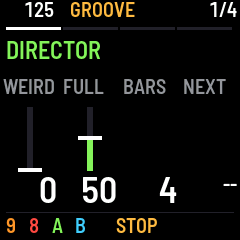
Tap ENV once. Knobs select target control, depth, cycle length and shape. All four controls run left to right in K1–K4 order. Depth has a vertical slider; the shape control shows its contour. Director uses the same four-column layout. Cycle lengths: 1, 2, 4 or 8 bars. The target is one of the selected instrument's four native sound controls. Drum parameters without a numeric control are ignored.
| White keys | Presets |
|---|---|
| 1–3 | Modulate: shallow / medium / deep |
| 4–6 | Growing saw: shallow / medium / deep |
| 7–9 | Falling saw: shallow / medium / deep |
| 10 / 12–16 | Stop all preset automation and return to manual values |
| 11 | Run the current custom shape/depth/length |
Presets capture the control's current value. K2 selects depth 0–127 and updates an active gesture without shifting its center or phase. The three key shortcuts choose 16, 32 and 48. Depth scales proportionally to the target range, then clips at its limits: center 5, depth 10 on a 0–127 target produces 0–15. Depth 0 holds the center. White key 11 runs any custom depth. The modulation triangle moves around the captured value; growing/falling saws move above/below it and repeat. The manual project setting is retained.
Automation joins the current musical phase: engage a four-bar grow in bar 3, and it joins midway through that cycle, resetting at the end of bar 4. It does not begin a new four-bar countdown. A new section establishes a new origin. Extending a section preserves its current position and postpones the next one.
Up to eight parameter gestures can run at once. Turning an automated sound knob takes over from its current audible value and cancels that gesture. Stopping transport returns gestures to manual settings. Preset automation is session-only. The shared bar reference is the 909's normal 16-step, sixteenth-note pattern; keep that reference and legacy song/chaining off for this performance workflow.
Director and section length
Tap ARP for Director. Knobs 1/2 are drum Weird/Full; knob 3 changes the current segment length; knob 4 queues the next section. Musical keys provide direct access:
| White key | Action |
|---|---|
| 1–7 | Queue INTRO, GROOVE, BUILD, BREAK, BRIDGE, DROP, OUTRO |
| 8 / 9 | Shrink / extend the current segment by one bar |
| 10 | Coordinate B and drums around the established A phrase |
Tap ARP again while Director is selected for the same coordination action, or to cancel a pending coordination plan. Choosing an already pending section cancels that section choice; another choice replaces it.
Segments start at four bars and can be adjusted from the current bar through 32 bars. They keep looping until a section is queued. An extra break bar moves the drop's downbeat later; shrinking moves it earlier without cutting the current bar. The new section starts at bar 1 with a fresh automation origin.
Initial arrangement behaviors preserve the actual phrases and sound settings: INTRO/OUTRO favor A, kick and hats; BREAK removes kicks and A; BRIDGE leaves space for B; GROOVE permits the ensemble; BUILD raises drum intensity and adds 303 accents in its final bar; DROP accents the first bar's kicks. OUTRO reduces drum intensity. Explicit performer mutes still win. These are initial section policies, not a complete autonomous composition system.
The phrase coordinator keeps A and prepares a related B response and groove. It needs nonempty A, forward 16-step 303s at sixteenth-note rate, automatic mutation off, a normal 909 clock pattern, and no legacy song/chaining.
Momentary FX
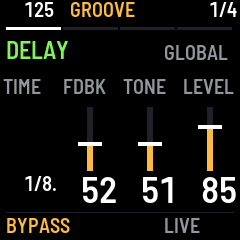
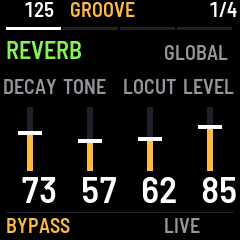
Tap FX for Momentary. Further FX taps cycle Delay, Reverb, Compressor, Comp Detail and Momentary. SELECT also cycles these views; HOME + SELECT changes tempo here. Hold a white key in any FX view; release it to return to the live signal.
| FX view | K1 | K2 | K3 | K4 |
|---|---|---|---|---|
| Momentary | DJ filter | Pump | Delay feedback | Reverb return |
| Delay | Time division | Feedback | Tone | Return level |
| Reverb | Decay | Tone | Low cut | Return level |
| Compressor | Amount | Attack | Release | Dry/wet mix |
| Comp Detail | Threshold | Ratio | Makeup | Kick pump |
Compressor Amount is a macro that changes threshold, ratio and makeup together; use Comp Detail for individual adjustments afterward.
| White key | Gesture |
|---|---|
| 1 / 2 | Low-pass / high-pass DJ filter |
| 3 / 4 | Kick pump / drive |
| 5 / 6 | Tape stop / chopper |
| 7 / 8 / 9 | Captured audio repeat at 1/8 / 1/16 / 1/32 |
| 10 / 11 / 12 | Snare roll at 1/8 / 1/16 / 1/32 |
Effect presses wait for the next 909 sixteenth-note event. WAIT indicates a pending effect; releasing before it starts cancels it. Chopper passes attacks and silences tails, relocking its open edge to each sixteenth. Release remains immediate with the existing short wet fade, rather than waiting for a grid line. Keep the normal 909 16-step/sixteenth clock running for these gestures.
The DJ filter affects the full mix: both drum kits, both 303s and the delay/reverb returns. Compression, pump, drive, tape stop, chopper and repeats also remain on the full mix.
One regular momentary effect and one snare roll can run together. Hold a roll key while turning K1 filter, or hold a low/high-pass key as well. Releasing one does not stop the other. Turning a knob releases the regular held effect; K1 takes over the audible filter position while the roll continues.
Rolls use the last focused 909/808 kit's current snare sound. The heading names the kit while rolling. They temporarily audition the snare even if its pattern voice is muted, but a whole-kit mute silences them. Pattern notes and mute states are not changed. Normal sequenced snare hits are suppressed during the roll to avoid doubled hits. Release stops retriggering and lets the last snare decay. Roll fronts follow the grid (eighth rolls start on alternate sixteenths); 1/32 adds a hit midway through each actual step interval, including swing. Rolls currently require internal clock; stop or leaving FX cancels them.
Repeats capture the real stereo sound after the master processing. Audio capture holds 16384 frames (about 371 ms at 44.1 kHz); very slow repeat lengths are capped to this available history. Capture preserves approximately +/-2 signal units; master output limiting still applies. Entry/release and loop seams are smoothed. Tape stop slows to zero over 400 ms, with a fade over its final 80 ms. Chopper repeats a complete open/closed cycle every sixteenth note while held.
To fit the capture ring without consuming the reserve, 32768 samples were reassigned from delay memory. The delay buffer is now 55432 samples (about 1.26 seconds instead of 2 seconds); longer delay requests clamp to available memory. Shared delay/reverb and their natural tails remain independent of the short performance capture. Breakbeat playback remains disabled.
Musical memory and saving
OCT+ makes new material; OCT- develops 303s or varies drums. SEQ captures LIKE; GLO restores selected captures (RETURN). ENV + OCT+ and LFO + OCT- remain alternative LIKE/RETURN gestures. REC tap is one-level musical undo; REC + OCT+ redo. Undo preserves your later sound/mix changes. New musical actions replace the previous history entry.
SAVE saves the project. LIKE captures, musical undo, mutes, section position and preset automation are session-only. Hold SEL and tap SEQ for classic editing, GLO for settings, or HOME for classic patterns. Plain HOME returns to LIVE; in LIVE it selects native instrument controls. HOME + EDIT is an alternative return gesture.