X0X Live for M-VAVE FM-1
An alternative FM-1 firmware for making acid music as you play. Discover a bassline, keep an idea you like, develop it, bring in drums and direct the next break or drop. Two independent 303s, 909 and 808 drums, hands-on sound controls and performance effects share one LIVE interface.
Current version: 1.2.1-live12 · experimental. Hardware validation is pending.
Play in your browser · Install on FM-1 · Full controls guide · Download firmware
What it does
- Two acid voices. Independent 303 patches with cutoff, resonance, envelope, decay, accent, waveform and drive, plus pan and effect sends.
- Generate, keep, develop. Discover phrases, LIKE an idea, explore variations and RETURN to it. Musical undo keeps your later sound changes.
- Generative drums. 909 and 808 kits with eleven instruments each. Weird and Full move a groove from sparse and straight to busy and adventurous. Kick and hats start audible; bring in other instruments with the keys.
- Direct the performance. Queue INTRO, GROOVE, BUILD, BREAK, BRIDGE, DROP or OUTRO. Extend or shorten the current segment by a bar. The Director prototype can prepare a complementary 303 B phrase and coordinated drums around A.
- Play the mix. Direct part and drum mutes, solo, linked selection and mix restoration. Four controls always follow the physical K1–K4 order.
- Shape movement and space. Bar-aligned modulation, growing and falling ramps; delay and reverb controls; momentary filters, pump, drive, tape stop, sixteenth-note chopper, captured audio repeats and live snare rolls.
Screens
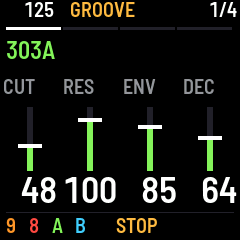
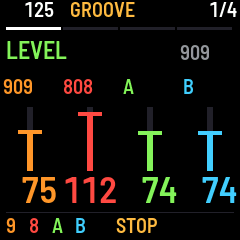
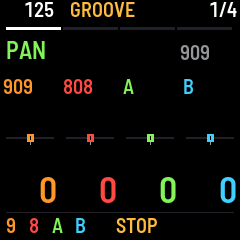
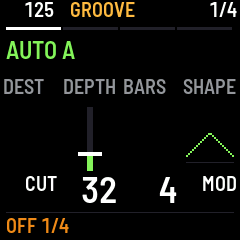
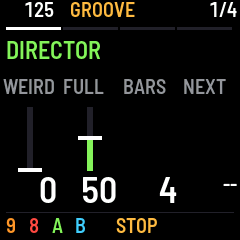
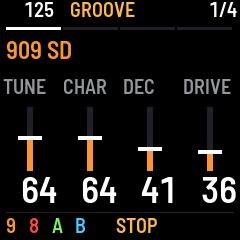
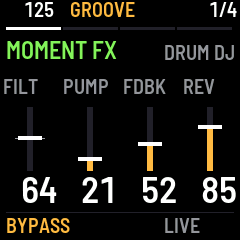
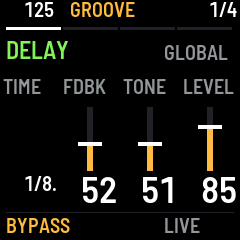
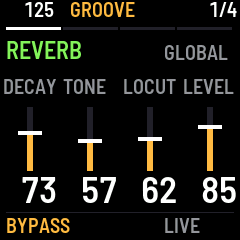
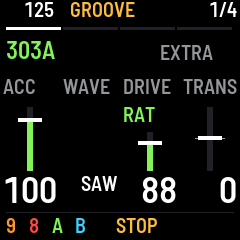
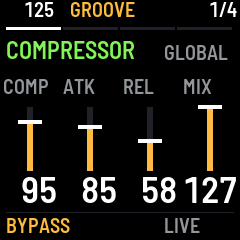
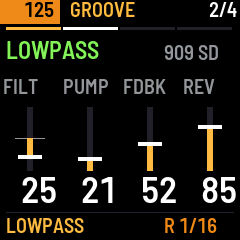
These screen captures illustrate the LIVE layout. The earlier FX capture says DRUM DJ; in live12 the DJ filter acts on the full mix. Each screen is 240 × 240; labels stay large, controls follow the knobs from left to right, and values are right-aligned. Pan uses horizontal sliders.
| Sound | Mixer | Pan |
|---|---|---|
| !303 sound controls | !Mixer levels | !Horizontal pan controls |
| Automation | Director | Drum instrument |
|---|---|---|
| !Automation controls | !Musical Director | !Selected drum instrument |
| Momentary FX | Delay | Reverb |
|---|---|---|
| !Momentary effects | !Delay controls | !Reverb controls |
| 303 extra controls | Compressor | Snare roll |
|---|---|---|
| !Combined Drive and transpose | !Compressor controls | !Snare roll and filter |
Install
- Back up first. For Sloop, use the Sloop editor. The X0X backup page handles X0X projects only. Keep your previous firmware and its recovery instructions.
- Connect the FM-1 with a USB data cable. Close other MIDI apps and editor tabs.
- Open the web installer in desktop Chrome or Edge and allow MIDI / SysEx access when asked.
- Follow the connection and installation instructions. Keep USB connected until the update completes and the instrument restarts.
- Start playing on LIVE.
Direct switching from every alternative firmware, including Sloop, is not yet verified. If the instrument will not start, see the recovery instructions.
Your first groove
- Start with 303 A selected. Press OCT+ to generate a phrase, then PLAY.
- Turn K1–K4 for cutoff, resonance, envelope modulation and decay.
- Tap ARP for Director, then ARP again to request a related B phrase and drum groove. During playback it arrives at the next segment boundary.
- Press SEQ to LIKE selected musical material. Use OCT− to develop it; GLO returns to the capture. REC undoes the last musical change.
- Tap LFO for Mixer. Black keys mute/unmute parts; white keys mute/unmute individual drums. PRESETS switches the focused 909/808 kit.
- Tap FX, then hold white keys for momentary effects. Release to return.
Find your controls
| Button | What you get |
|---|---|
| EDIT | Selected instrument's sound; tap again for extra controls |
| LFO | Mixer; repeated taps cycle Level, Pan, Reverb send, Delay send |
| FX | Momentary, Delay, Reverb, Compressor and Comp Detail; repeated taps cycle them |
| ENV | Automation: destination, depth, bars and shape |
| ARP | Director: Weird, Full, segment length and next section |
| HOME | Return to LIVE sound controls |
| SAVE | Save the current project |
SELECT also cycles views inside Mixer and FX. HOME + SELECT changes tempo there; SELECT elsewhere in LIVE changes tempo directly.
The first four black keys select 909 / 808 / 303 A / 303 B outside Mixer; hold SEL to select several. On a drum sound screen, white keys select the instrument named in the heading. In Mixer, those keys operate mutes instead. Tap the selected black key again to toggle its native/extra sound controls, just like EDIT. The 303 extra controls are Accent, Wave, Drive and Transpose (−24..+24 semitones on the current pattern). DRIVE 0 is off; 1–63 spans SOFT; 64–127 spans RAT, with gentle 1:1 amounts at positions 64–68. Hold REC + a musical key for solo. HOME + SEL restores the captured mix.
Global FX controls: Delay has time division, feedback, tone and return level. Reverb has decay, tone, low cut and return level. White keys keep their momentary FX gestures in every FX view. Compressor has amount, attack, release and dry/wet mix; Comp Detail has threshold, ratio, makeup and kick pump. The amount macro changes threshold, ratio and makeup together; use Comp Detail afterward for individual adjustments.
Snare rolls: hold white keys 10 / 11 / 12 in FX for 1/8 / 1/16 / 1/32 rolls on the last selected drum kit. Hold a roll while turning K1 DJ filter or holding a filter key. Releasing one does not stop the other. The DJ filter affects the full mix: both drum kits, both 303s and delay/reverb returns.
Beat-aligned effects: effect presses wait for the next sixteenth-note event. Release before it starts to cancel. Chopper passes attacks and silences tails, with its open edge locked to each sixteenth. Rolls retrigger the current snare sound without editing the pattern; whole-kit mutes still win. Roll gestures require the internal clock and stop when transport stops.
Automation: K2 sets depth from 0 to 127. White keys offer three depths each of modulation, growing and falling ramps; cycles are 1, 2, 4 or 8 bars. A four-bar ramp engaged in bar 3 joins the current phase and resets after bar 4. Turn the sound knob to take over manually.
For detailed editing, hold SEL + SEQ; for settings, SEL + GLO. Press HOME to come back. The controls guide covers every key gesture, section control and automation preset.
Saving and current limits
SAVE preserves the project. LIKE captures patterns and generator settings, not synth patches or the mix. Captures, musical undo, manual mutes, section position and automation are temporary performance state and do not survive a restart. Named scene presets and a persistent favorites library are not available yet.
Tape stop, chopper, repeats, drive, pump and the DJ filter act on the master mix. Momentary starts require playback and the normal 909 16-step sixteenth-note reference. Repeat history is about 371 ms, so longer repeats are capped. Maximum delay is about 1.26 seconds. Breakbeat playback is disabled in this version. The Director is an early prototype; the firmware has not yet been validated on physical FM-1 hardware.
Credits
Based on X0X by Charles Vestal and Felucca by Leo Kuroshita / Hügelton Instruments. The acid voices use Open303; drums derive from 9W9 and 8W8; generation derives from schwung-tb3po. 909 cymbal/hat samples are ER-99 by Matthew Cieplak. Existing credits and notices are retained. X0X is GPL-3.0-only, Open303 is MIT and fonts are SIL OFL 1.1; see LICENSE and licensing notes.
This is an independent project, unaffiliated with M-VAVE or Roland.